How do I set up a loan service?
Use a loan service to set up a customer loan.
A loan is used more often than not for a tap loan. The city is going to loan the customer the money because the city knows the customer cannot afford it. The city sets up a loan and loan service.
A loan service permits you to set up one active loan per account.
Usually, one loan service is enough. If you find that you need to add another loan to a customer who already has a loan, then you'll need to set up another loan service. You can actually set up as many loan services as needed.
Setting up a loan service
1. Open Connect Utility Management > Organization > Services.
2. Click New (CTRL+N).
3. Set up the service as usual but set the Type to Loan.
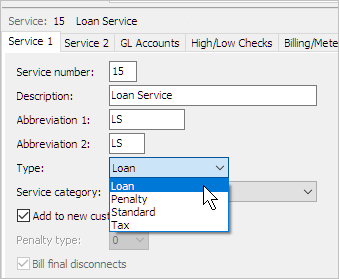
Loan as Service Type
4. Click Save (CTRL+S).
The loan service is set up. Now, you're ready to set up a loan, see the help topic titled How do I set up a loan?
Updated 12Dec2017
Copyright © 2020 Caselle, Incorporated. All rights reserved.