Accounts Payable Year-end Checklist
Review the vendors that are set up as 1099 type vendors. You’ll want to check the vendor’s name and tax ID.
In this Topic Hide
Step 2. Verify the Vendor 1099 Settings
How do I verify the vendor 1099 settings?
Verifying vendors set up as a 1099 vendor
Viewing vendors and 1099 vendors
How do I correct errors on 1099 Vendors?
How do I change the name that prints on the 1099 Form?
Why is the 1099 Information important?
What if I make changes to the 1099 vendor information?
What's the difference between Attorneys Fees Retainer and Attorneys Fees Settlement?
Learn how Connect processes 1099s, how to verify 1099 settings, simplifying the 1099 vendor report, (go to time marker 6m00s in the 2019 Year-end Checklist).
Watch a video clip on printing the Vendor List to verify 1099 settings (6m24s).
The easiest way is to print the Vendor List for 1099 vendors. Make sure all of the vendors who have been paid this year are set up in the Vendor table. Running this report in January following the tax year, will print vendor information for the new year instead of the tax year. To print the vendor information for the tax year, choose [Report].PY payments instead of [Report].YTD payments.
Watch a video clip on verifying 1099 information (8m23s).
Check if the 1099 vendor is assigned to the correct 1099 type, 1099 ID, and recipient information. If you need more information, you can print the vendor list for vendors set up as a 1099 vendor (optional) or print a comprehensive vendor list (optional).
Do this...
1. Open Connect Accounts Payable > Reports > Vendor List.
2. Select the Vendor List - 1099 Vendor List [Caselle Master].
3. Click Print (CTRL+P) or click Preview (CTRL+Q).
4. Use the report to review the settings assigned to 1099 vendors.
Check the 1099 Type, 1099 ID, and Recipient Information. Make sure the vendor's 1099 information on the W-9 Form matches the information that is saved in the 1099 Information.
Exceptions: (1) If the Name field on the W-9 Form lists a Social Security number, use the person's name to fill in the Name field in the 1099 Information. (2) If the Name field on the W-9 Form uses a TIN number, you may need to replace the person's name with the company name.
Did you find any errors in the 1099 Type, 1099 ID, or Recipient Information?
Yes, I found errors. Use Vendors > Modify Existing Vendors to enter the correct information. For instructions, see How Do I Correct Errors on 1099 Vendors.
No, I did not find any errors. You’re done. Continue to Step 3: Print 1099 Reconciliation Report.
Print this report to review the vendors that are set up as a 1099 vendor. Use this report to make sure vendors who are not 1099 vendors are not included on the list.
Do this...
1. Open Connect Accounts Payable > Reports > Vendor List.
2. Select the report definition titled Vendor List - By Vendor Number [Caselle Master].
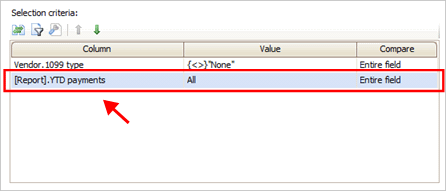
3. Change the Selection Criteria to include: [Report].YTD payments
Selection Criteria
To learn how to add [Report].YTD payments, see the help topic titled How do I add [Report].YTD payments to a report?
4. Change the Value to is not equal to zero "(< >)0".
This will show vendors with a payment during the tax year.
5. Click Print (CTRL+P).
The report lists vendors that are currently set up as a 1099 vendor.
Published 22Dec2017
This report shows the 1099 type and ID number. Unlike a table list or Report Writer report, this report does not encrypt the ID number. Use this report to find any vendors who should be set up as 1099 vendors.
Do this...
1. Open Connect Accounts Payable > Reports > Vendor List.
2. Select the report definition titled Vendor List - By Vendor Number [Caselle Master].
3. Click the Columns tab.
4. Add [Report].YTD Payments.
To print the report prior to January, add [Reports].YTD Payments.
To print the report after January, add [Reports].PY.Payments.

Columns tab, Adding the [Report].YTD Payments column
5. Click Print (CTRL+P).
The report lists all vendors.
15Nov2018
You’ll need to correct any mistakes you find on the Vendor List before you continue with the year-end checklist.
Learn how to correct errors on 1099 vendors. Watch a video (2m6s)
Do this...
1. Open Connect Accounts Payable > Vendors > Modify Existing Vendors.
2. Use the Lookup bar to enter the vendor number. Press Enter.
The vendor record displays.
3. Click the Vendor tab.
It’s usually the default setting to display the Vendor tab. You’ll find the 1099 Vendor information on this tab.
4. Use the 1099 Information area to update the 1099 Type, ID Number, and Name.
IMPORTANT!
Attorneys Fee Settlement and Attorney Fees Retainer are not the same. An
attorney fee settlement is when
a court orders an attorney to pay the settlement fee. This is the amount
that you use to fill in Box 14, Gross Proceeds Paid to an Attorney on
the 1099=MISC Form. An attorney retainer
fee is the normally monthly charges for counseling the organization.
This amount is placed in Box 7, Nonemployee Compensation, on your 1099-MISC
Form.
Where can I check the 1099 vendor’s TIN, Business Name, and ID? The www.irs.gov website has tools to check a vendor’s TIN, business name, and ID. You may need to enter some of your organization’s information to use this tool.
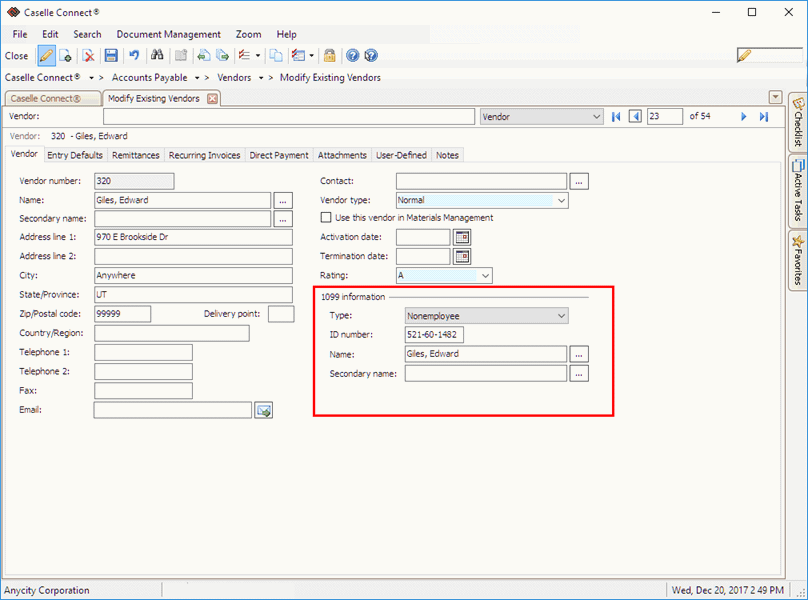
1099 Information in Modify Existing Vendors
When you select the 1099 Information Type, Connect will copy the vendor’s name from the vendor file to the Name field in the section titled 1099 Information. You can change the vendor name that prints on the 1099 Form by clicking on the Name or Secondary Name field and typing in a new name.
Learn how to save the W-9 Form as an attachment. Watch a video (0m42s)
15Nov2018
The information that displays in the section titled 1099 Information in the vendor record is the information that Connect will use to fill in the 1099 Form.
Reprint the Vendor List for 1099 Vendors to review and verify any changes that you have made to 1099 vendors.
Updated 20Dec2017
An Attorney Fees Settlement is when the court is ordered to pay an attorney the settlement fee. This amount is placed in Box 14, Gross Proceeds Paid to an Attorney on the 1099-MISC Form.
An Attorney Fees Retainer is the normal monthly charges for counseling the organization. This amount is placed in Box 7, Nonemployee Compensation, on your 1099-MISC Form.
Updated 15Nov2018
The Nonemployee type is entered in Box 7.
Updated 22Dec2017