
Set up pending assets.
Connect can create a pending asset when you import assets from a non-Caselle application, when you record an invoice for an asset in the Accounts Payable application, or when a job is closed in Project Accounting. A pending asset is an asset that is waiting for you to determine what action to take to process it.
You can use Manage Pending Assets to process pending assets:
Add an asset
Retire an asset
Remove an asset from the Pending Asset list
Important! Connect will not depreciate pending assets.
In this Topic Hide
1. Open Connect Asset Management > Assets > Manage Pending Assets.
The pending assets appear in the table. When you open Manage Pending Assets, the pane on the left displays all of the imported assets.
Pending Assets pane in Manage Pending Assets
2. Select the pending assets to process.
You can select and process a single pending asset or a group of pending assets. Choose an action to perform.
Which assets do you want to process?
I want to process all pending assets. Select the checkbox, located in the column-heading row, to select all of the pending assets.
I want to select which pending assets to process. Select the checkbox, located next to the asset, to include it. Clearing the checkbox will exclude the pending asset from processing.
3. Select a pending asset.
The pending asset is highlighted and the pending asset information displays in the pane to the right.
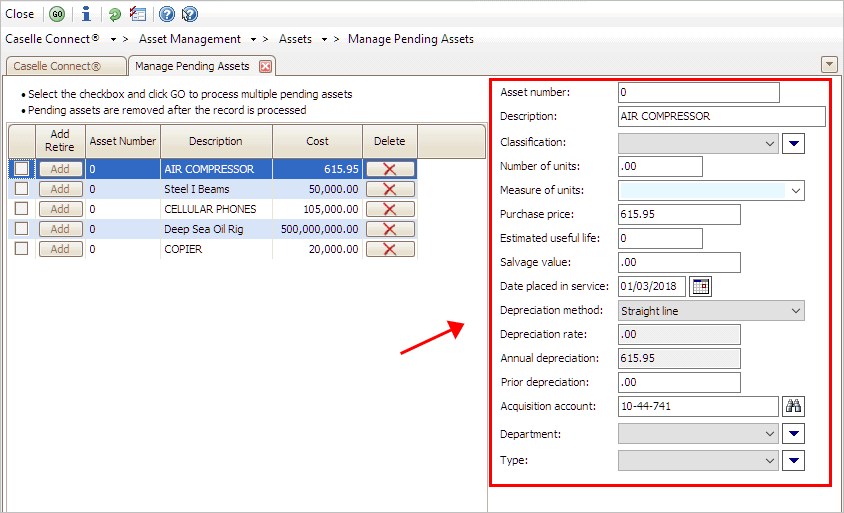
Asset Information pane in Manage Pending Assets
4. Enter the asset information.
The next step is to fill in the fields on the right side of the form. These fields show the asset detail. You can review the asset detail and update fields as needed.
5. Repeat steps 3 and 4 until you have reviewed and updated all of the pending asset information for the pending assets that have been selected for processing.
6. Click GO (CTRL+G) to process the pending assets.
When you click GO, Connect creates an asset record in the Asset table and removes the pending asset from the pending asset list. Now, the asset will begin depreciating.
Updated 03Jan2018
When there's an item in the pending asset list that shouldn't be there, click the Delete button to remove it.

Delete button in Manage Pending Assets
Updated 03Jan20183
How do I allocate total accumulated depreciation to prior years?
How do I filter pending assets?
How do I update my pending assets with new data?
What is the pending asset type?
Where can I view asset information?
What is the pending asset type?
What is the salvage value of the pending asset?
Where can I view asset information?