Use hours recorded in Timekeeping to calculate payroll.
If you are using Connect Timekeeping and Connect Online Timekeeping to track the hours worked by employees, then you can use Import Hours from Timekeeping to import the employee hours to calculate payroll checks and employee benefits.
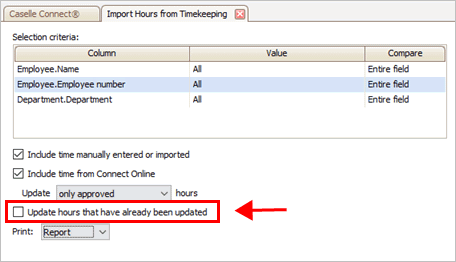
1. Open Connect Payroll > Employees > Import Hours from Timekeeping.
2. Select the Selection Criteria.
What is the selection criteria?
How do I add/remove fields to a selection criteria?
How do I define values in a selection criteria?
How do I search for an exact match?
How to use operators in the selection criteria?
22Jan2018
3. Set up the import options.
Include time manually entered or imported
Include time from Connect Online
4. Do not select the checkbox titled Update Hours That Have Already Been Updated.
Update hours that have already been updated checkbox
5. Set up the Print option.
You can create transactions, print a report, or create transactions and print a report.
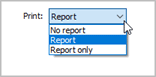
Print menu
What do you want to do?
I want to create transactions without printing a report. Select No Report from the Print menu.
I want to print a report without creating transactions. Select Report Only from the Print menu.
I want to create transactions AND print a report. Select Report from the Print menu.
6. Click GO (CTRL+G).
Payroll imports the time entries from Timekeeping.
2019.05, 2019Jul23
Select the checkbox to import hours that were entered using Enter Leave Time Adjustments in Connect Payroll and Enter Employee Time in Connect Timekeeping.
Select the checkbox to import hours that were entered in Connect Online. You can choose to import
only hours that have been approved, or
hours that have been approved and hours that have been submitted but have not been approved.