Why use a Steps Checklist?
Overview
Using a Steps Checklist will keep you on track. It will help you understand what you need to do to complete a process, for example, for electronic meter reading, billing month-end.
Contents
Watch a video
Changing Checklist Tasks (5m46s)
Printing a Utility Management Steps Checklist
1. Open Connect Utility Management.
2. Click the Checklist tab.

The Checklist fly-out menu displays the default checklist.
3. If the Utility Management Steps Checklist isn't showing, use the drop-down menu to select it.
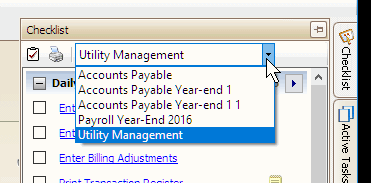
Working with Steps Checklists
Click here for more information on working with Steps Checklists.
Copyright © 2025 Caselle, Incorporated. All rights reserved.