Contract List
The Contract List prints a report for customers with contracts. It includes the contract terms and payoff information.
Printing a Contract List
1. Open Connect Utility Management > Reports > Contract List.
2. Select a report definition.
3. Select the report date range.
4. Set up the report options.
5. Set up the Selection Criteria, Report Order, Report Sections, and Columns.
6. Click Print (CTRL+P).
The Contract List prints.
2019.05, 2019Mar14
Filter the report by contact status
You can select the contact status to include on the report.
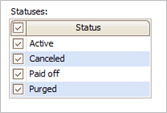
Statuses section
Which contact status do you want to include on the report?
Click to select the checkbox next to a contact status to select it.
Remove the checkmark from the checkbox to exclude a contact status.
Selection Criteria, Report Order, and Columns
In version 2019.05 or later, you can also use these report columns to set up the report:
[Report].Account balance
[Report].Active account at location
[Report].Active contract
[Report].Direct pay status
[Report].Equal pay total
[Report].Last payment amount
[Report].Last payment date
[Report].Last shutoff date
[Report].Master contact name
[Report].Master contact number
2019.05
Copyright © 2025 Caselle, Incorporated. All rights reserved.