How do I make a service subject to penalty?
Service type penalty
When a service is subject to penalty, a penalty will be billed when the service balance is delinquent for the specified number of periods. You can set up a service to bill penalty.
For example, City XYZ has an electric service that is subject to penalty. City XYZ chooses to calculate penalty on the delinquent balance for the last two months. City XYZ sets up the subject to penalty options on the electric service, like this...
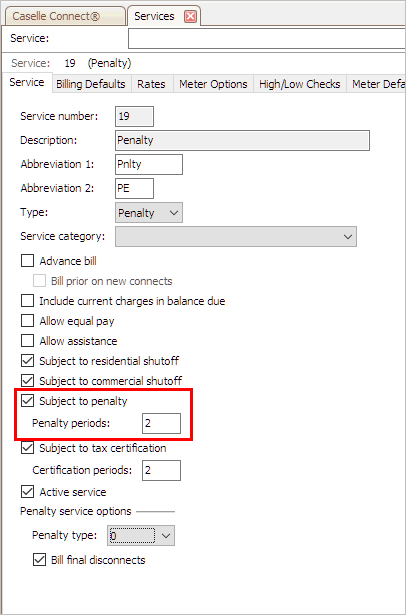
Subject To Penalty and Penalty Periods
When City XYZ autobills an account with a delinquent balance for two or more months, Connect will also calculate penalty on the delinquent balance that exceeds the two penalty periods. While a delinquent balance that is less than two penalty periods old will not be subject to penalty.
Contents
Subjecting a service to penalty
Change the options on a service to bill penalty on a delinquent balance.
Do this...
1. Open Connect Utility Management > Organization > Services.
You can find the Subject to Penalty options on the Service tab.
2. Click to select the checkbox titled Subject to Penalty.

Subject To Penalty checkbox
3. Enter the Penalty Periods.
Define the number of periods in the delinquent period. When the delinquent account balance is delinquent for the number of penalty periods that is defined here, Connect will calculate penalty on the delinquent account balance.
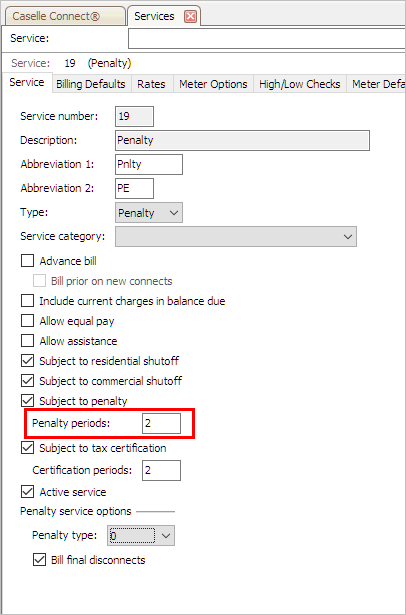
Penalty Periods field
4. Click Save (CTRL+S).
The service is subject to penalty and the penalty period is saved.
Updated 12Dec2017
Removing a penalty from a service that is subject to penalty
Do not bill penalty on a service.
Do this...
1. Open Connect Utility Management > Organization > Services.
You can find the Subject to Penalty options on the Service tab.
2. Click to deselect the checkbox titled Subject to Penalty.
3. Click Save (CTRL+S).
The service will not bill penalty on a delinquent balance.
Updated 12Dec2017
Copyright © 2025 Caselle, Incorporated. All rights reserved.