How do I modify pending deposits?
Modify Data
Warning! Contact Customer Service at (800) 243-8275 before you attempt to use Modify Data. The tools in Modify Data will modify or delete transactions. There is no undo for this routine.
Before you get started
-
Back up the Utility Management database. See the help topic titled How do I back up the database?
Modifying pending deposits
1. Open Connect Utility Management > Organization > Modify Data.
The Modify Data Menu window displays on the screen.
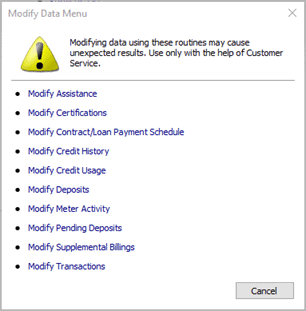
Modify Data Menu
2. Click to select Modify Pending Deposits.
Copyright © 2020 Caselle, Incorporated. All rights reserved.