How do I enter temperature/ET?
Record the temperature or evapotranspiration rate for a weather region.
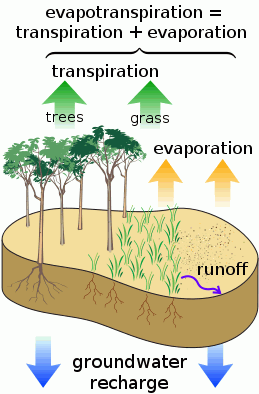
The temperature is the degree of hotness or coldness using the Fahrenheit or Celsius scale. The evapotranspiration rate is the sum of evaporation and plant transpiration. Evapotranspiration is part of the water cycle. Use Enter Temperature/ET to record the temperature or evapotranspiration rate for a weather region.
Contents
Entering temperature/ET
Create a transaction to record a temperature.
Do this...
1. Open Connect Utility Management > Organization > Enter Temperature/ET.
2. Select a Service.
Select the service with a temperature/ET entry.
3. Select a Type.
The temperature is the degree of hotness or coldness using the Fahrenheit or Celsius scale. The ET, or evapotranspiration rate, is the sum of evaporation and plant transpiration.
4. Enter or select a Weather Region.
Use the Weather Region field to specify the average climate by selecting a region or typing in a new region name.
5. Verify the Date.
This is the date of the temperature/ET reading.
7. Enter a Temperature.
This is the temperature/ET reading.
8. Click Save (CTRL+S).
The transaction is saved.
Changing a temperature/ET entry
You can edit the properties assigned to a temperature/ET entry.
Do this...
1. Open Connect Utility Management > Organization > Enter Temperature/ET.
2. Click Edit (CTRL+E).
3. Click to select an entry from the transaction grid.
The temperature/ET entries display in the screen.
4. Now, modify the transaction properties.
5. Click Save (CTRL+S).
The transaction is updated.
Deleting a temperature/ET entry
Remove a temperature/ET entry transaction.
Do this...
1. Open Connect Utility Management > Organization > Enter Temperature/ET.
2. Click Delete (CTRL+D).
3. Use the options on the Delete Temperature/ET form to select the transaction or transactions to delete.
4. Click OK.
The transaction is deleted.
Updated on 22Jun2017.
Copyright © 2025 Caselle, Incorporated. All rights reserved.