How do I set up cosigners?
A cosigner shares joint responsibility for an account.
Adding a cosigner
Create a new record for a cosigner and then add a customer using the cosigner to the record.
Do this...
1. Open Connect Utility Management > Organization > Cosigners.
2. Click New (CTRL+N).
3. Add the Cosigner name, address, and personal information.
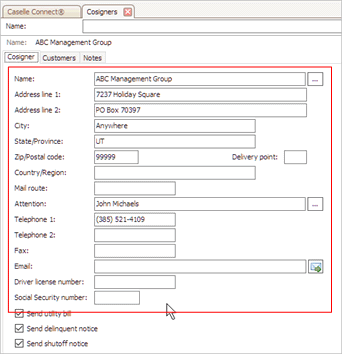
4. Set up the checkbox titled Send Utility Bill.
Use Send Utility Bill to send a utility bill to the cosigner. Do not select the checkbox to send a utility bill to the customer without sending a utility bill to the cosigner.
5. Set up the checkbox titled Send Delinquent Notice.
Use Send Delinquent Notice to send a delinquent notice to the cosigner. Do not select the checkbox to send a delinquent notice to the customer without sending a notice to the customer.
6. Set up the checkbox titled Send Shutoff Notice.
Use Send Shutoff Notice to send a shutoff notice to the cosigner when this option is selected. Do not select the checkbox to send a shutoff notice to the customer without sending a notice to the customer.
7. Link a customer to the cosigner.
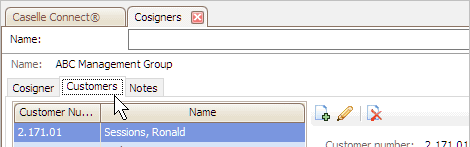
Use the options on the Customers tab to add the customers the cosigner has agreed to share joint responsibility for the utility account.
Click the Customers tab.
Click Add a New Customer.
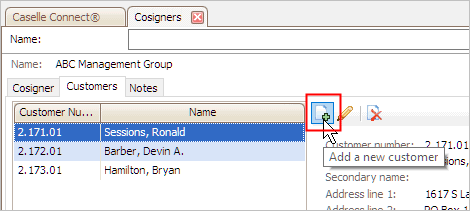
The Search form displays.
Enter the customer name to link to the cosigner.

Click OK.
The customer is assigned to the cosigner.
8. Click Save (CTRL+S).
The cosigner is saved.
Change a cosigner
Edit the properties on a consigner.
Do this...
1. Open Connect Utility Management > Organization > Cosigners.
2. Use the Lookup bar to enter a cosigner name. Press Enter.
3. Now, edit the fields on the record.
4. Click Save (CTRL+S).
The cosigner is updated.
Deleting a cosigner
You cannot delete a cosigner when related transactions exist.
Do this...
1. Open Connect Utility Management > Organization > Cosigners.
2. Use the Lookup bar to enter a cosigner name. Press Enter.
3. Click Delete (CTRL+D).
The cosigner is deleted.
Updated on 21Jun 2017.
Copyright © 2025 Caselle, Incorporated. All rights reserved.