How do I add a connection type to a location?
Modify Existing Locations
Assign the connection type a meter uses to connect to a service address. Some organizations use the connection type to print reports and track billing and usage. The connection type menu shows a list of user-defined values. You can add the connection types that you will need to track to the list. When you need to review usage or billing by connection type, you can print the Connection Type Report.
Before you get started
-
If this is your first time adding a connection type to a location, the option to Use Master Properties from System Management needs to be selected. More
Adding a connection type to a location
1. Open Connect Utility Management > Locations > Modify Existing Locations.
2. Use the Connection Type box to add a new connection type or select a connection type from a list of previous entries.
To add a new connection, click on the box and type in a new connection type description.

Connection Type box
Or use the drop-down menu to view a list of entries created during a different session. Selecting a value from the menu can help you use the same description as before.
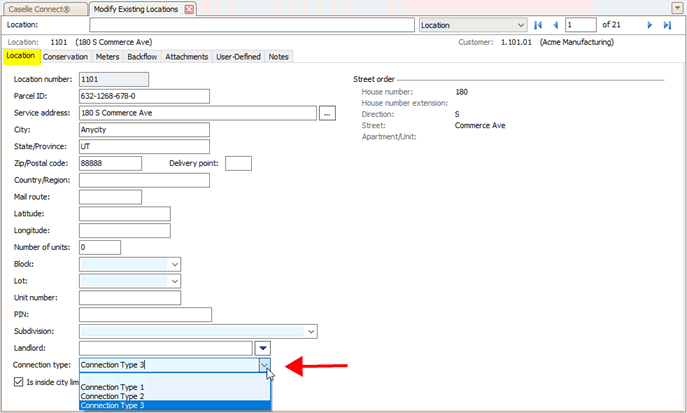
Connection Type menu
3. Click Save  (CTRL+S).
202111, 2021Dec21
Related topics
How do I print a connection type report?
How do I synchronize master properties from System Management?
Copyright © 2025 Caselle, Incorporated. All rights reserved.