How do I set up my default values to allow a zero amount deposit?
Setup New Customers - Options
Change my default settings to allow deposits for a zero amount on new customers.
Contents
What's new
-
2018.11 or later. See what's new in the 2018.11 release. Rewrite of features and options.
Allowing zero amount deposit on new customers
1. Open Connect Utility Management > Customers > Setup New Customers.
2. Click Options (F12).
3. Click to select the Deposits/Notes tab.
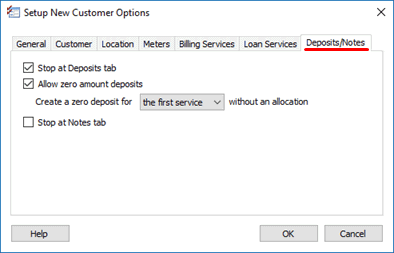
Deposit/Notes tab
4. Click to select the checkbox titled Allow Zero Amount Deposits.
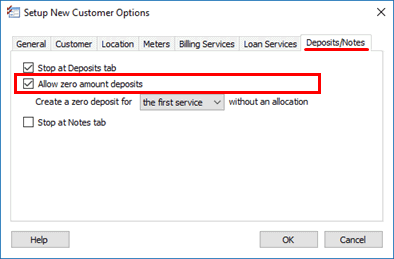
Allow zero amount deposits
5. Set up Create a Zero Deposit for [the first service/all services] Without an Allocation.

Create a zero deposit for x without an allocation
6. Click OK.
You can set up a deposit for a zero amount on a new customer.
Updated 08Aug2018
Copyright © 2025 Caselle, Incorporated. All rights reserved.