How do I apply/refund interest?
Automatically Apply Deposits/Interest
Apply interest or refund interest on a deposit.
Contents
Applying interest
When you refund interest, running this routine will apply interest to the deposit for the selected services. The interest will be applied to the service with the deposit.
Do this...
1. Open Connect Utility Management > Customers > Automatically Apply Deposits/Interest.
2. Click to select the Apply/Refund Interest checkbox.
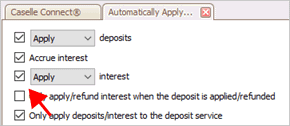
Apply/Refund interest checkbox
3. Use the Apply/Refund Interest list to select Apply.
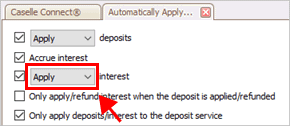
Apply/Refund interest list
3. Set up the following options.
Include final billed customers
Exclude/Include customers with a cosigner, landlord, or both
4. Click GO (CTRL+G).
Connect applies interest to services with deposits.
202005, 2020Mar24
Refunding interest
When interest is refunded, running this routine will create a refund transaction and refund check for interest. Interest will not be refunded on delinquent accounts.
What needs to be set up create a refund check? To create a refund check, the Pending Check Interface in Utility Management must be set up and the Connect Check on Demand application must be installed. To learn how to set up the Pending Check Interface, see How do I set up my Utility Management interface? To purchase the Connect Check on Demand application, contact Caselle at (800) 228-9851.
Do this...
1. Open Connect Utility Management > Customers > Automatically Apply Deposits/Interest.
2. Click to select the Apply/Refund Interest checkbox.
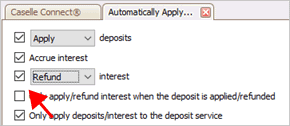
Apply/Refund interest checkbox
3. Use the Apply/Refund Interest list to select Refund.
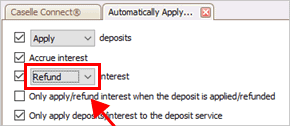
Apply/Refund interest list
4. Set up the following options.
5. Click GO (CTRL+G).
Connect refunds interest on services with deposits. If the Pending Check interface is set up, a refund check is created.
202005, 2020Mar24
Applying/Refunding deposits
See How do I apply/refund deposits?
Accruing interest
Copyright © 2025 Caselle, Incorporated. All rights reserved.