How do I view a customer's balance by service chart?
Customer Inquiry
View the customer balances by service as a pie chart.
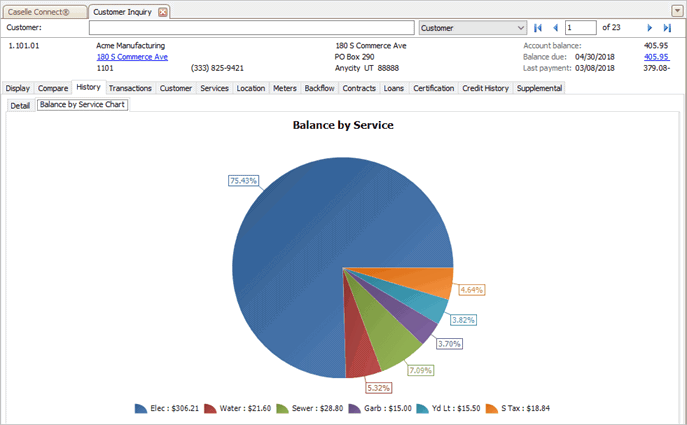
Balance by Service Chart
Contents
Watch a video
Learn more about the Balances Chart, Detail Chart, Billing Usage Chart, Billed Amount Chart, Billing Chart, and Balance by Service Chart. Watch a video (4m45s)
Viewing balance by service chart
1. Open Connect Utility Management > Customers > Customer Inquiry.
2. Look up a customer.
3. Click to select the History tab.
4. Click to select the Balance by Service Chart tab.
2019.11, 2019Sep24
Printing and saving charts
How do I save a chart as a file?
Copyright © 2025 Caselle, Incorporated. All rights reserved.