How do I filter personal property tax statements by account balance?
Reports
Set up the Personal Property Tax Statements to print statements based on the account balance, current tax period balance, or prior tax period balance.
Filtering personal property tax statements by account balance
These instructions show you how to filter property tax statements by the account balance; however, you can filter by the current tax period balance or prior tax period balance by substituting [Report].Personal Property Current Tax Balance or [Report]. Personal Property Prior Period Balance.
Do this...
1. Open Connect Property Tax Collection > Reports > Personal Property Tax Statements.
The current period displays as the date range. The current date is the default billing date.
2. Set up the report options as usual.
To learn how to set up Personal Property Tax Statements, click here.
3. Click on the Columns header to add [Report].Personal Property Balance to the Selection Criteria.
To learn how to add a column to the Selection Criteria, click here.

[Report].Personal property balance in the Selection Criteria
4. Set up the Value assigned to [Report].Personal Property Balance.
To learn how to change the value, click here.
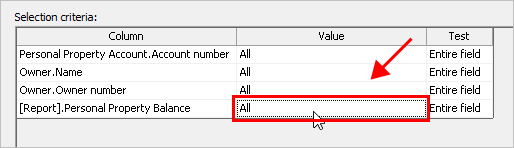
All value for [Report].Personal property balance
5. Click GO (CTRL+GO).
Connect uses the options that you have selected to print the personal property tax statements.
2019.08, 2019Aug19
Copyright © 2020 Caselle, Incorporated. All rights reserved.