How do I calculate interest?
Owners
Calculate interest on property tax for each period. Use this routine to calculate the interest amount on personal property or real property.
This routine will calculate interest for each period.
Contents
Before you get started
Add the calculation for calculating interest to the Calculations table. See the help topic titled How do I add a calculation?
Calculating interest for personal property
Use personal property to calculate interest for a material asset, such as a car, boat, mobile home, and so on for personal or business use.
Do this...
1. Open Connect Property Tax Collection > Owners > Calculate Interest.
2. Use the Calculation box to select an interest calculation.
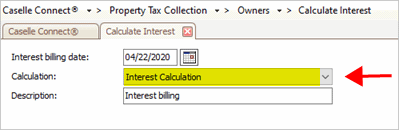
Calculation box
What if the interest calculation is not included in the list? The Calculation list will display only interest type calculations. To add an interest type calculation, see Adding an interest calculation
3. Use the Description box to enter a transaction description.
This is the transaction description the routine will use to create interest transactions. Example: Interest
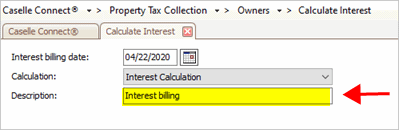
Description box
4. Click to select the Personal Property checkbox.
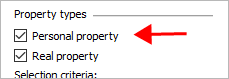
Personal property checkbox
5. Set up the selection criteria.
You can apply unapplied payments for a personal property account by changing All to a personal property account.

Value for Personal Property Account.Account number
6. Click GO (CTRL+G).
The routine calculates interest.
Calculating interest for real property
Use real property to calculate interest for land or a piece of real estate.
Do this...
1. Open Connect Property Tax Collection > Owners > Calculate Interest.
2. Use the Calculation box to select an interest calculation.
Calculation box
What if the interest calculation is not included in the list? The Calculation list will display only interest type calculations. To add an interest type calculation, see Adding an interest calculation
3. Use the Description box to enter a transaction description.
This is the transaction description the routine will use to create interest transactions. Example: Interest
Description box
4. Click to select the Real Property checkbox.

Real property checkbox
5. Set up the selection criteria.
You can apply unapplied payments for a real property account by changing All to a parcel ID.
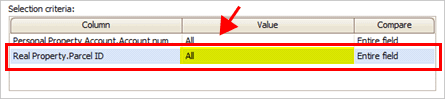
Value for Real Property Account.Account number
6. Click GO (CTRL+G).
The routine calculates interest.
202005, 2020Apr22
Copyright © 2025 Caselle, Incorporated. All rights reserved.