How do I add Oregon (OR) statewide transit wages and tax? (Government Reporting)
W-2 Employees
Add the Oregon statewide transit wages and tax to a W-2 employee. When you create the Oregon W-2 electronic file, the electronic file will include the Oregon statewide transit tax.
Before you get started
Convert the year-end tax information. See How do I convert year-end tax information?
Set up Oregon (OR) in the Government Reporting States table. See How do I set up W-2 state-specific fields?
Adding OR statewide transit wages and tax
1. Open Connect Payroll > Government Reporting > W-2 Employees.
2. Click to select the Wage Information tab.
3. Click to select the States tab.
4. Use the pane on the left side of the screen to select Oregon (OR).
5. Set up the Oregon Statewide Transit section.
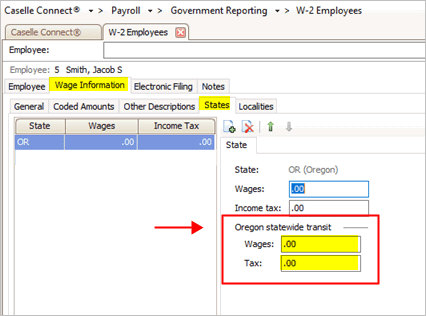
Oregon statewide transit section
Use the Wages box to enter the wages for calculating the statewide transit tax.
Use the Tax box to enter the amount of the statewide transit tax for the employee.
6. Click Save (CTRL+S).
The transit wages and tax is saved.
202008, 2020Mar30
Copyright © 2020 Caselle, Incorporated. All rights reserved.