How do I print a payment schedule? (Inquiry)
Inquiry
Print a payment schedule for an owner from Inquiry.
Watch a video
Learn how to print the owner's payment schedule. Watch a video (0m33s).
Printing a payment schedule in Inquiry
1. Open Connect Property Improvements > Inquiry.
2. Look up an account.
3. Click to select the Payment Schedule tab.
The owner's payment schedule displays on the screen in view only mode.
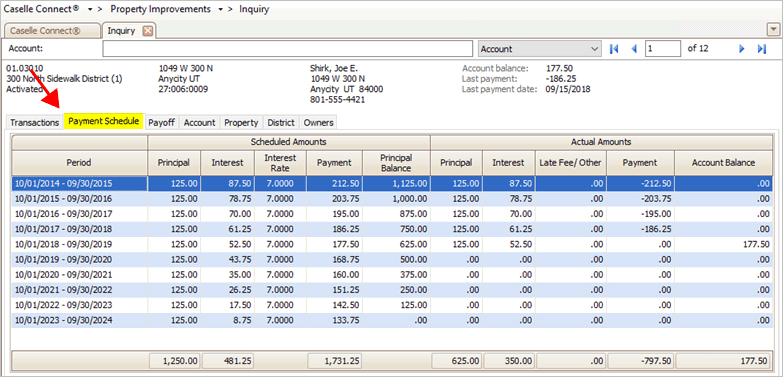
Payment Schedule tab in Inquiry
4. Click the mini-button on the Print button to view the Print menu.

Mini-button on the Print button
5. Click to select Print Grid.

Print menu
The Preview pane shows the Property Improvements Inquiry - Payment Schedule for the selected owner.

Preview pane
2019.08, 2019May28
Copyright © 2020 Caselle, Incorporated. All rights reserved.