How do I troubleshoot deposits that don't balance?
Reconciling cleared deposits.
If you're reconciling deposits and the deposits don't match, you can start tracking the deposit amounts by printing a Cleared Deposit List. You can use the Cleared Deposit List to verify that the deposits that have been cleared on the bank reconciliation have actually been cleared.
Printing a Cleared Deposit List
1. From the Reconcile Bank Accounts screen, use the toolbar to click Print (CTRL+P).

Print button
2. Select Deposit List.
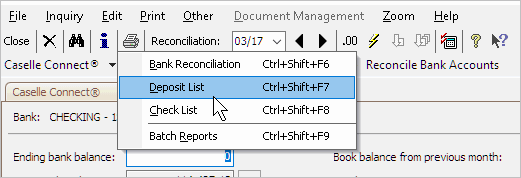
Selecting Deposit List
The Deposit List Report launches.
3. Use the Title menu to select Deposit List - Summary [Caselle Master].
4. Click to remove the checkmark from the Include Outstanding Deposits checkbox.
5. Click Print (CTRL+P).
The Deposit List will show cleared deposits. Use the Cleared Deposit List to verify that the deposits that have been cleared on the bank statement have been cleared in bank reconciliation.
Published 23Aug2017
Comparing the Cleared Deposit List to the bank statement
You can use the Cleared Deposit List to see if the deposit amount that has been cleared in Connect has also been cleared on the bank statement. If the deposit amount on the Cleared Deposit List matches the deposit amount on the bank statement, you can use a pencil or highlighter to mark the amount on both the Cleared Deposit List and the bank statement. That way, you know that the deposit was cleared by the bank and in Connect.
You want to try to find a matching amount for each deposit listed on the bank statement.
When you finish comparing the Cleared Deposit List to the bank statement, you should find a deposit that isn't highlighted on the Cleared Deposit List or a deposit that isn't highlighted on the bank statement. That's the deposit that's causing the problem.
Published 23Aug2017
Fixing a deposit for the wrong amount
You need to find out why the deposit is for the wrong amount.
-
Was the wrong amount entered on the journal entry?
-
Have all of the transactions been updated from Cash Receipting?
Published 23Aug2017
Fixing a deposit missing from the bank statement
You need to find out why the deposit is missing from the bank statement.
-
For example, is this deposit from Cash Receipting that hasn't been updated to General Ledger? If so, you would update General Ledger for the deposit date in Cash Receipting.
-
Is it an ACH payment that was recorded into your account? Then, you'll need to record a CRJE journal entry to put that amount into your bank reconciliation.
Updated 11Sep2017
Copyright © 2025 Caselle, Incorporated. All rights reserved.