How do I set up a folder?
Folders
Folders are stored in drawers. You can create a folder inside a folder. If Document Management is syncing with Connect applications, it will use the synchronize settings to create new folders. But you can also create a new folder in Document Management that exists in Document Management and won't sync the folder's contents with Connect applications.
The number of folders that Document Management can support is limited by the storage space on your system.
In this Topic
Watch a video
Learn how to add a folder to a drawer (1m58s)
Updated 26Apr2018
Adding a folder
1. Open Connect Document Management.
2. Select a drawer from the navigation pane.
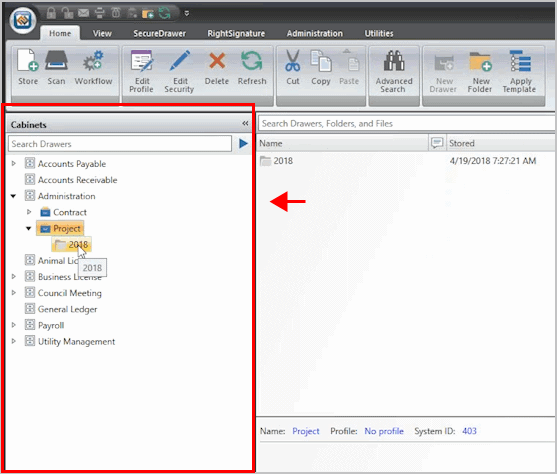
Navigation pane
3. Click New Folder.

New Folder button
The New Folder form displays. Just like setting up a drawer, the fields that display on this form are linked to a profile. If the folder is not linked to a profile, you'll see a form that looks like this...
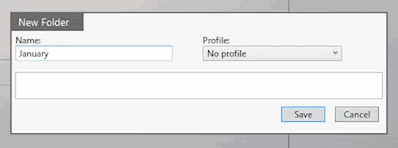
New Folder
4. Enter the New Folder properties and then click Save.
Tip! The app saves folders in alphabetical order. If you are setting up folders for each month in the year, for example, add a number to the folder name (01 January, 02 February, 03 March, and so on).
The new folder displays in the navigation pane.
Updated 26Apr2018.
Copyright © 2020 Caselle, Incorporated. All rights reserved.