How do I update a single payment to a subsystem? (Update Payments)
Update Payments
Use the Selection Criteria to update a single payment to a subsystem.
Updating a single payment
1. Open Connect Cash Receipting > Payments > Update Payments.
2. Set up the update payment options.
To learn how to set up the update payment options, see the help topic titled How do I post payments to interfaced applications?
3. Use the Selection Criteria to double-click All next to Receipt.Receipt number.
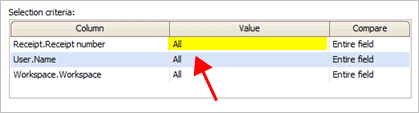
All value for Receipt.Receipt number
4. Use the Enter Value box to enter a receipt value and then click OK.

Enter Value
The receipt number displays in the Selection Criteria.

Receipt number value set to a single receipt number
5. Click GO (CTRL+G).
The receipt number that you have selected is updated to the subsystem.
2019.11, 2019Sep23
Copyright © 2025 Caselle, Incorporated. All rights reserved.