Transaction Register
Use the Transaction Register to verify the transactions that have been created and recorded in the system.
Printing a Transaction Register
1. Open Connect Cemetery Management > Reports > Transaction Register.
2. Select the report definition.
3. Select the report dates.
How do I change the report date range?
How do I change the date type?
4. Set up the report options.
5. Set up the Selection Criteria, Report Order, and Report Sections.
How do I set up the Selection Criteria?
How do I set up the Report Order?
6. Click Print (CTRL+P).
The report prints.
2019.08, 2019Jun06
Transaction types
Filter the report by transaction type.
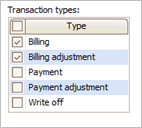
Transaction types
Billings
A billing is the total amount of billed amounts within a given period.
Billing adjustments
A billing adjustment is a transaction that changes the billing balance because of an event.
Payments
A payment is compensation that is given in return for goods or services.
Payment adjustments
A payment adjustment is a transaction that corrects or modifies the amount or details of a payment entry.
Write-offs
A write-off eliminates a customer's account balance when it is not collectable
Copyright © 2025 Caselle, Incorporated. All rights reserved.