What's a Fee?
A fee is a charge billed for services rendered. Use Fees to add, modify, or delete tax fees.
Example:
-
Late Fees
-
Interest for Late Payment
-
Non-filing Fees
-
Recording Fees
Adding a fee
1. Open Connect Business Tax Collection > Organization > Fees.
2. Click New (CTRL+N).
3. Enter the Fee Number.
The fee number is a unique number assigned to a fee. You can use it to look up and report fee information.
4. Enter the Description.
A description is a word or phrase that describes the character or features of the fee.
Do you want to use the default description?
-
Yes, I want to use the default description. Continue to the next field.
-
No, I want to use a different description. Click on the Description field, and then type in a new description (up to 40 characters).
5. Set up the option to Bill Minimum Amount.
Use bill minimum amount to bill at least x dollars even when the billed amount is less than the billed minimum amount. For example, Jane bills a minimum amount of $10. When she uses this rate to calculate an amount, the billed amount is $7.00. Since the rate is set up to bill minimum amount and the calculated billed amount is less than the bill minimum amount, the account is billed $10.00.
Do you want to bill minimum amount?
-
Yes, bill minimum amount. Click to select Bill Minimum Amount. Then, enter the minimum amount to bill in the Bill Minimum Amount field.
-
No, bill calculated amount. Clear the Bill Minimum Amount checkbox.
6. Set up the option to Bill Maximum Amount.
Use bill maximum amount to bill x dollars when the account balance is greater than the billed maximum amount. For example, Jane adds a rate that bills a maximum of $100. She uses this rate to calculate an amount. The billed amount is $125.00. Because the rate is set up to bill a maximum amount and the calculated amount is greater than the billed maximum amount, the account is billed $100.00.
Do you want to bill maximum amount?
-
Yes, bill maximum amount. Click to select Bill Maximum Amount. Then, enter the maximum amount to bill in the Bill Maximum Amount field.
-
No, bill calculated amount. Clear the Bill Maximum Amount checkbox.
7. Enter the Base Amount.
A base amount is an amount charged in addition to the calculated amount.
Total Calculated Amount = Base Amount + Calculated Amount
Do you want to charge a base amount?
-
Yes, charge a base amount. Use the Base Amount field to enter an amount.
-
No, do not charge a base amount. Enter zero (0) as the Base Amount.
8. Enter the Default Agency.
The agency is the organization that is responsible for the fee. Use the Default Agency drop-down list to select the name of the agency assessing the fee.
9. Enter the Calculate Based On.
The base is the option that serves as the basis for calculating an amount. The based on option allows you to determine the fee amount based on the filing status, delinquent amount, or manual entry.
10. Enter the Penalty Days.
A penalty is the sum to be forfeited based on the specified conditions and terms. Penalty Days refers to the number of days following a payment due date when a fee is assessed.
What do you want to do?
-
I want to bill penalty if the payment due date is past. Click to select Bill Penalty If Over. Enter the number of days past the due date in the Bill Penalty If Over [ _ ] Days.
-
I want to bill penalty if the payment due date occurs during a date range. Click to select Bill Penalty If Over. Enter the date range in the Bill Penalty If Over [ _ ] Days and Not Over [ _ ] Days. For example, City XYZ wants to bill fees after 30 days but not more than 90 days.
11. Set up the Rates.
A rate is a charge, payment, or price fixed according to a ratio, scale, or standard. Use Rate table to set up the levels and amounts that the system will use to calculate the fee. The rate calculates based on the level. You can set up a rate for each calculation level, or tier. .
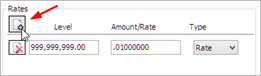
To add a rate...
-
Click Add a Rate. A blank level, amount/rate, and type appears. Enter the level, amount/rate, and type to set up the rate.
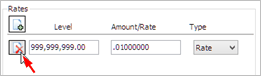
To remove a rate...
-
Click Delete to remove a level from the rate table.
12. Click the Used for Calculation tab.
You can include other fees and tax types in the formula to calculate a fee. Use the options on the Used for Calculation tab to add or remove fees and tax types from the calculation formula. When you select the fee, the application will use the fees and tax types that you have selected on this tab to calculate the fee amount.
13. Click the General Ledger Accounts tab.
A GL account is an account in the General Ledger that records credits and debits.
What is the GL account to record the fee amounts?
-
I know the GL account. Use the GL Account field to type in a valid GL account.
-
I need to look up the GL account. You can Search this field.
14. Click Save (CTRL+S).
The new fee is saved.
Changing a fee
1. Open Connect Business Tax Collection > Organization > Fees.
2. Use the Lookup bar to enter a fee number. Press Enter.
3. Now, edit the fee properties.
4. Click Save (CTRL+S).
The updated fee is saved.
Deleting a fee
1. Open Connect Business Tax Collection > Organization > Fees.
2. Use the Lookup bar to enter a fee number. Press Enter.
3. Click Delete (CTRL+D).
The fee is deleted.
Options
Base amount
A base amount is an amount charged in addition to the calculated amount.
Total Calculated Amount = Base Amount + Calculated Amount
Do you want to charge a base amount?
-
Yes, charge a base amount. Use the Base Amount field to enter an amount.
-
No, do not charge a base amount. Enter zero (0) as the Base Amount.
Bill maximum amount
Use bill maximum amount to bill x dollars when the account balance is greater than the billed maximum amount. For example, Jane adds a rate that bills a maximum of $100. She uses this rate to calculate an amount. The billed amount is $125.00. Because the rate is set up to bill a maximum amount and the calculated amount is greater than the billed maximum amount, the account is billed $100.00.
Do you want to bill maximum amount?
-
Yes, bill maximum amount. Click to select Bill Maximum Amount. Then, enter the maximum amount to bill in the Bill Maximum Amount field.
-
No, bill calculated amount. Clear the Bill Maximum Amount checkbox.
Bill minimum amount
Use bill minimum amount to bill at least x dollars even when the billed amount is less than the billed minimum amount. For example, Jane bills a minimum amount of $10. When she uses this rate to calculate an amount, the billed amount is $7.00. Since the rate is set up to bill minimum amount and the calculated billed amount is less than the bill minimum amount, the account is billed $10.00.
Do you want to bill minimum amount?
-
Yes, bill minimum amount. Click to select Bill Minimum Amount. Then, enter the minimum amount to bill in the Bill Minimum Amount field.
-
No, bill calculated amount. Clear the Bill Minimum Amount checkbox.
Calculate based on
The base is the option that serves as the basis for calculating an amount. The based on option allows you to determine the fee amount based on the filing status, delinquent amount, or manual entry.
Default agency
The agency is the organization that is responsible for the fee. Use the Default Agency drop-down list to select the name of the agency assessing the fee.
Description
A description is a word or phrase that describes the character or features of the fee.
Do you want to use the default description?
-
Yes, I want to use the default description. Continue to the next field.
-
No, I want to use a different description. Click on the Description field, and then type in a new description (up to 40 characters).
Fee number
The fee number is a unique number assigned to a fee. You can use it to look up and report fee information.
General Ledger accounts
A GL account is an account in the General Ledger that records credits and debits.
A cash account is an account for depositing cash.
Accounts receivable is the amount that your customers owe you in total.
A write-off account eliminates a customer's account balance when it is not collectable.
A revenue account records increases in a company's resources from the sale of goods and services.
What is the GL account to be billed?
-
I know the GL account. Use the GL Account field to type in a valid GL account.
-
I need to look up the GL account. You can Search this field.
Penalty days
A penalty is the sum to be forfeited based on the specified conditions and terms. Penalty Days refers to the number of days following a payment due date when a fee is assessed.
Rates
A rate is a charge, payment, or price fixed according to a ratio, scale, or standard. Use Rate table to set up the levels and amounts that the system will use to calculate the fee.
Used for calculation
You can include other fees and tax types in the formula to calculate a fee. Use the options on the Used for Calculation tab to add or remove fees and tax types from the calculation formula.
Copyright © 2025 Caselle, Incorporated. All rights reserved.