How do I add a license to a business?
Businesses
Part of setting up a new business includes adding the licenses the business will use for daily operation.
Before you get started
Set up the license types for the licenses that you will be adding to the business.
Adding a license to a business
1. Open Connect Business License > Businesses > Setup New Business or Modify Existing Business.
2. Click the Licenses tab.
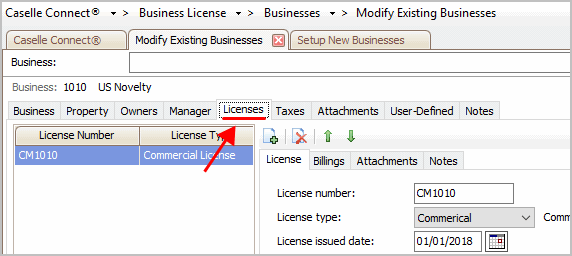
Licenses tab
3. Click Add a New License.
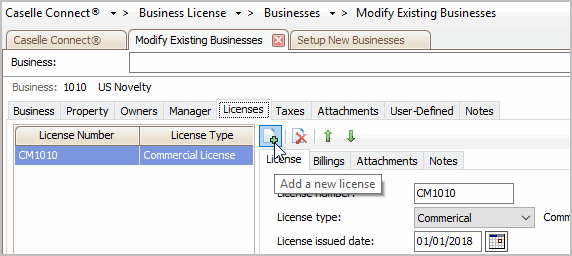
Add a New License
A blank line is added to the license pane on the left and the fields are cleared on the right side of the screen.
4. Fill in the license information on the License tab (required).
This is what kind of license and when does it expire.
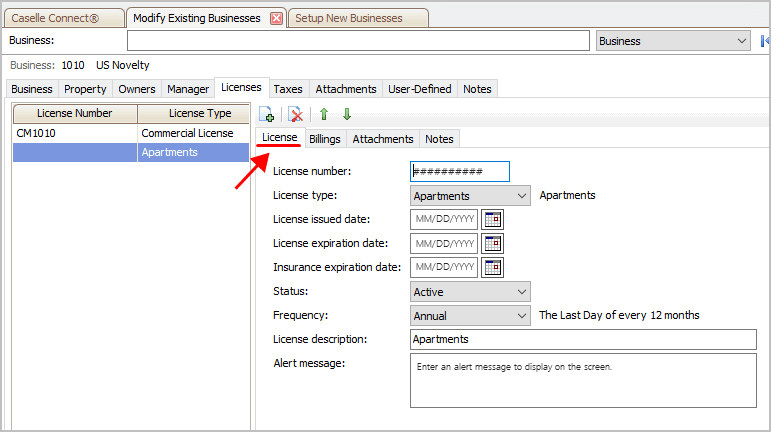
License tab
5. Fill in the billing information on the Billings tab (required).
This is what to bill for the license. The billings tab shows you the rate that is linked to the license type.
Click Add a New Billing.
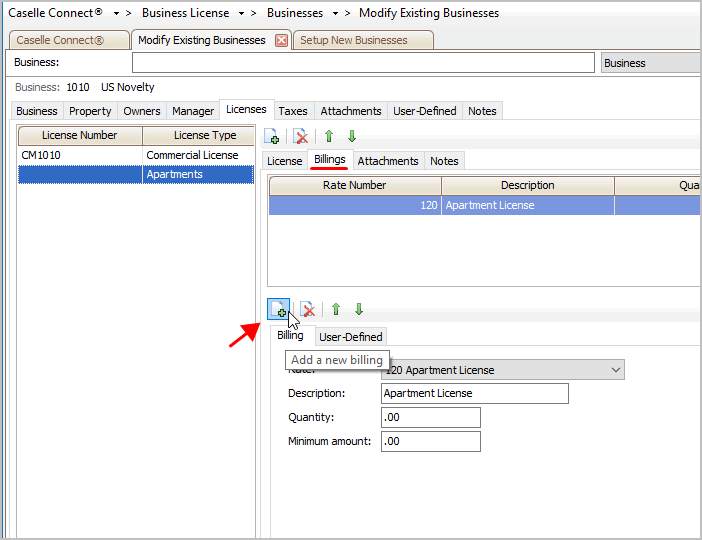
Billings tab - adding a new billing
Select the rate, description, quantity, and minimum amount.
How do I add a billing rate?
6. Fill in the license tax return (optional).
How do I add a tax return type to a business?
7. Add attachments and notes (optional).
8. Click Save (CTRL+S).
The business is saved. If you need to update any information, use Modify Existing Business.
Updated 21Jun2018
Copyright © 2025 Caselle, Incorporated. All rights reserved.