Why can't I select the Send Renewal Email checkbox?
Calculate Billings
When you calculate billings, you can send a license renewal email to the license owner. Here are some troubleshooting tips that you can try.
Checking the billing options
To send a license renewal email, you'll need to select the checkbox titled Send Renewal Email.
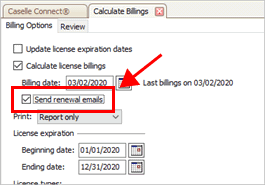
Send renewal email checkbox
Fixing a warning icon
If a warning  displays next to the Send Renewal Email
checkbox, you need exit the Calculate Billings routine and set up a renewal
license email template.
displays next to the Send Renewal Email
checkbox, you need exit the Calculate Billings routine and set up a renewal
license email template.
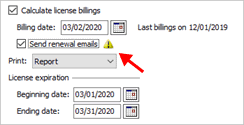
Warning next to the Send Renewal Email checkbox
To learn how to set up a renewal email template in Organization, see the help topic titled How do I set up an email template to renew licenses?
When you're done setting up the email template to renew licenses, open the Calculate Billings routine and you'll find that you can select the Send Renewal Email checkbox without displaying a warning.
Getting help
If you're still having trouble sending renewal emails when you run Calculate Billings, call customer support at (800) 228-9851.
202005, 2020Mar02
Copyright © 2025 Caselle, Incorporated. All rights reserved.