How do I add the requester name to a form?
Forms
Add the name of the user who requested the purchase order to the purchase order form definition. When the purchase order form prints it will include the requester name.

Requested by variable on PO form definition
Adding requested by variable
1. Open Connect Accounts Payable > Organization > Purchase and Requisition Forms.
2. Click Variables List  .
.
3. Enter Requested By in the text box.
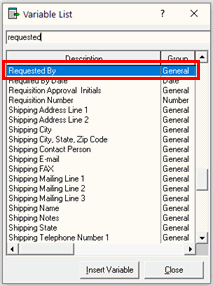
Variable List
4. Click Insert Variable.
5. Position the variable on the workspace.
202105, 2021Apr13
Copyright © 2025 Caselle, Incorporated. All rights reserved.