How do I change my default bank? (Manual checks)
Manual check options
Select the default bank for processing manual checks.
Changing my default bank
1. Open Connect Accounts Payable > Invoices and Payments > Enter Manual Checks.
2. Click Options  (F12).
3. Use the Default Bank box to select a bank.
The bank must be set up and saved in the Banks table. To learn more, see
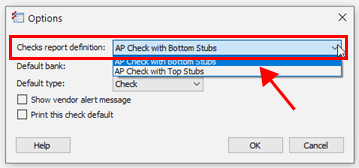
Checks report definition box
4. Click OK.
The default report definition is saved.
202011, 2020Aug10
Copyright © 2025 Caselle, Incorporated. All rights reserved.