How do I set up the public portal?
System Management
Connect Public Portal is an internet application for organizations who use Connect applications and wish to use the internet to make some of the customer information available to the account owner. Your organization can use the public portal to send and receive information and the account owner can use the public portal to set up a new account, review their account information, pay fees, and submit an application. You have control over how much access the customer has to their information. The public portal allows the account owner to complete these tasks on their own from any computer, tablet, or smart phone with access to the internet.
How do I purchase the Public Portal? The public portal is an add-on module. To purchase the Public Portal for Business License, contact your client service representative at (800) 228-9851.
Connect applications that support the public portal
-
Business License
-
Property Tax Collection
Setting up the public portal
1. Open Connect System Management > Organization > Organization.
2. Click to select the Interfaces tab.
3. Click to select the Use Public Portal checkbox.
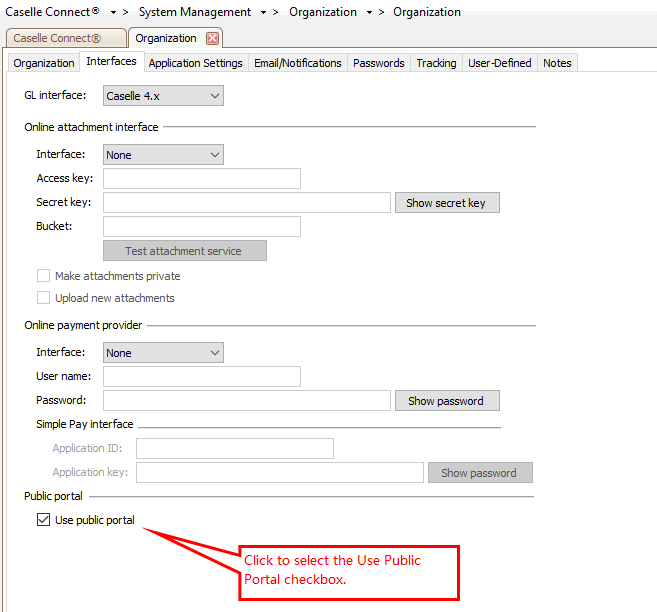
System Management > Organization, Use Public Portal checkbox
The public portal will use the email address in the master contact to send notifications to the account owner. The account owner email address will be validated and only one master contact can be linked to the email address. Setting up the public portal will validate the email address for each master contact. If a the same email address is used on more than one master contact, the duplicate email address will be removed. If the email address field includes more than one email address, only the first email address will be saved as the primary email address.
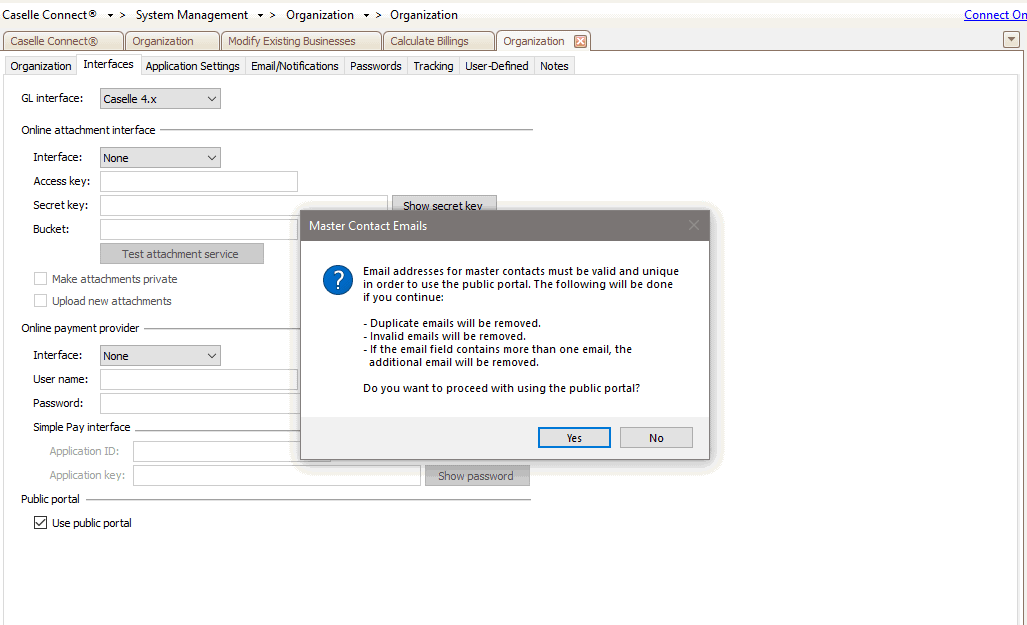
Sytstem Management > Organization, Master Contact Emails
If you'd like to review the master contact information before you set up the public portal, open System Management > Master Records and select Setup/Modify Contacts.
4. Click Yes.
202211, 2022Nov
Copyright © 2025 Caselle, Incorporated. All rights reserved.