Where is the default directory for Caselle Cloud?
Caselle Cloud
Issue
I'm exporting a checklist and it save it to the default Caselle Cloud directory, but I have no idea where that is located. How do I find it?
Explanation
The default directory for Caselle Cloud is in the Caselle Cloud. When you're done exporting the checklist, the checklist will be saved the ...\configfiles directory in the Caselle Cloud. Which you will only be able to access by running Caselle Cloud and using the tools inside of Caselle Hosted applications. The files stored in Caselle Cloud will not be displayed in the Windows Explorer.
Solution
To fix this issue,
-
launch Caselle Cloud. [More]
-
Login to Caselle Cloud. [More]
-
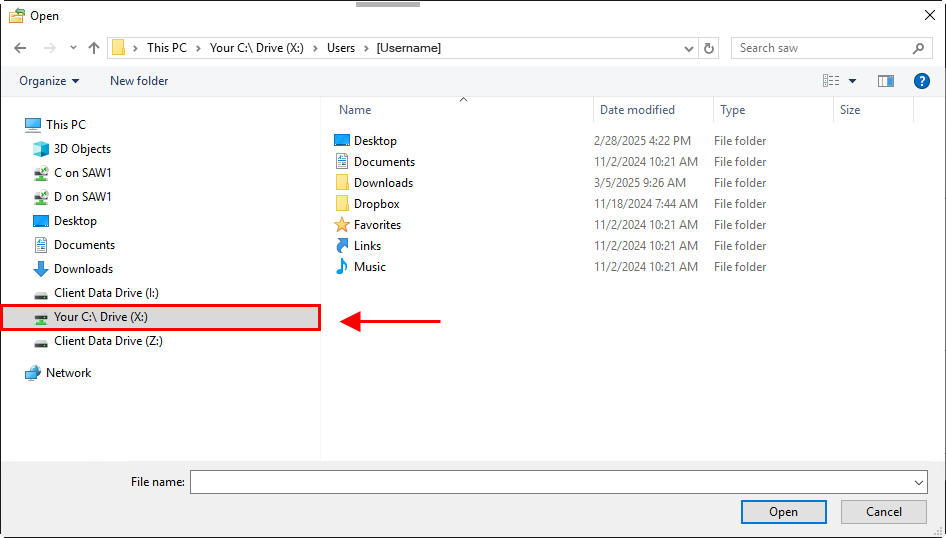
to locate the checklist (or report definition, form definition, file, PDF, and so on), click Browse. Navigate to \\Client Data Drive to find the default directory in Caselle Cloud.

-
if you're working in Caselle Cloud and you need to find a file on your computer, use \\Your C:\Drive
202505, 2025Mar03
Copyright © 2025 Caselle, Incorporated. All rights reserved.