How do I install Caselle Cloud Launcher? (2025.05)
Caselle Cloud
Install the Caselle Cloud Launcher on each workstation that will be using Caselle Cloud to run Caselle Hosted applications.
Installing Caselle Cloud Launcher
1. Download the Installer.
Choose an option to download the installer:
-
Click this link to download the installer: [Installer]
-
Or open an internet browser, and then copy and paste https://downloads.caselleconnect.com/casellecloudlauncherinstaller?zip in the address bar.

Note: You may have to allow the installer to download and run by clicking Yes or Allow.
2. In the Downloads folder, unzip the zip file.
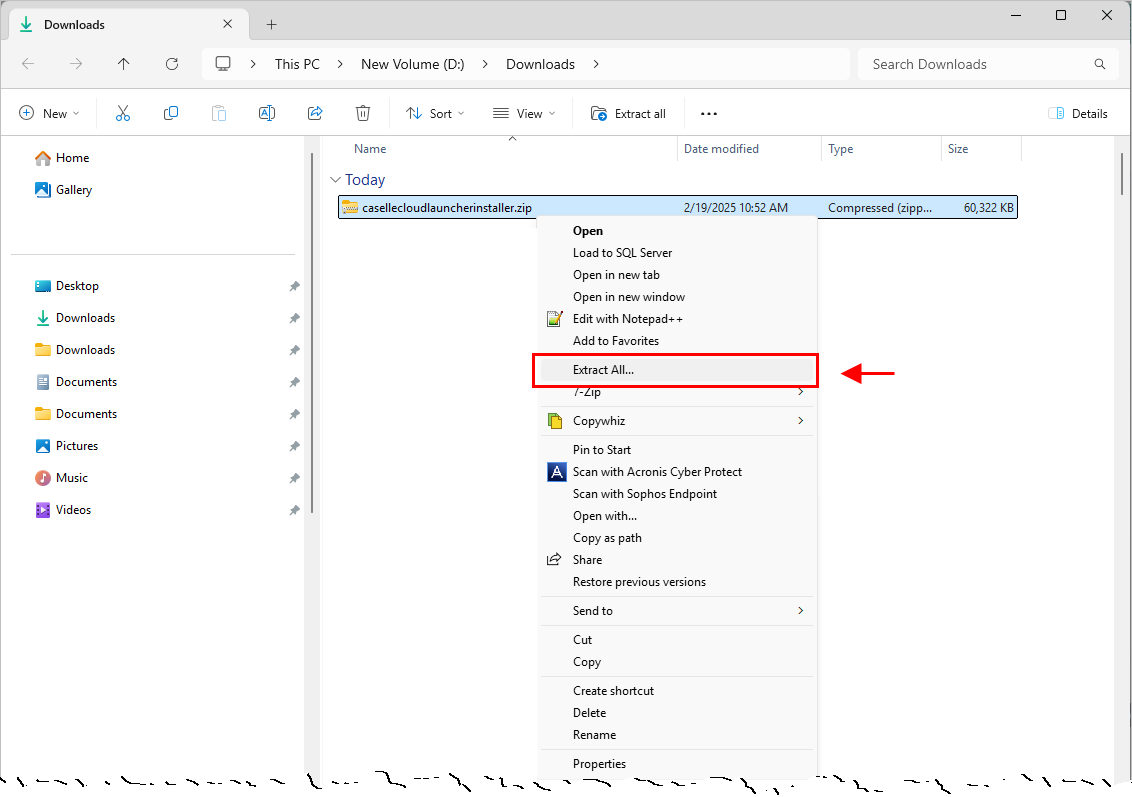
3. In the casellecloudlauncherinstaller folder, double-click Caselle.Cloud.Launcher.Installer.exe

4. Accept the EULA license terms and conditions, and then click  .
.

5. To launch Caselle Cloud, launch Connect Online and then click Caselle Cloud Launcher  .
.
Use the URL to launch Connect Online that was sent to you from Caselle support. Example: aws.######.caselleranch.com
Tip! Add a bookmark to save the URL to your Favorites or Bookmarks toolbar. To the right of the address bar, select Bookmark  .
.

Related topics
How do I configure my Caselle Cloud workspace? (2025.05)
Warning: The publisher of this RemoteApp program can't be identified... (2025.05)
How do I launch Caselle Cloud Launcher? (2025.05)
How do I run applications from Caselle Cloud? (2025.05)
How do I login to Caselle Cloud? (2025.05)
How do I log out? (Caselle Cloud) (2025.05)
202502, 2025Feb24
Copyright © 2025 Caselle, Incorporated. All rights reserved.