How do I use activity codes to track COVID-19 expenses? (General Ledger)
Activity Codes
Set up activity codes to track expenses associated with COVID-19. If you aren't using activity reporting, you'll need to set up activity reporting before you get started. Then, you'll set up activity reporting in the Connect subsystems (for example, Payroll, Accounts Payable, and Timekeeping). When you're finished, you will be able to view expenses for COVID-19 in General Ledger using Activity Inquiry or printing activity reports.
Step 1. Turn on activity reporting
Set up activity reporting in Connect General Ledger and in Connect subsystems, such as Accounts Payable and Payroll, that you will use to track COVID-19 expenses.
First, turn on activity reporting in General Ledger.
Set up activity reporting in Connect General Ledger (Connect General Ledger > Organization > Organization). To learn how, see Turning on activity reporting in General Ledger.
Second, turn on activity reporting in the subsystems that you will use to track expenses.
For example, most organizations will turn on activity reporting in Connect Accounts Payable and Connect Payroll. This is a list of the most commonly used subsystems, but you can add the COVID-19 activity to any subsystem that supports GL activities. The GL Activities checkbox is usually located on the General Ledger tab in Organization.
Accounts Payable
To learn how to set up activity reporting in Accounts Payable, see How do I set up activity reporting? (Accounts Payable)
Accounts Receivable
To learn how to set up activity reporting in Accounts Receivable, see How do I use activity reporting? (Accounts Receivable)
Cash Receipting
To learn how to set up activity reporting in Cash Receipting, see How do I make activity reporting available? (Cash Receipting)
Payroll
To learn how to set up activity reporting in Payroll, see How do I set up activity reporting? (Payroll)
Timekeeping
To learn how to add a GL activity code to a timekeeping activity, see Tracking an Activity Code by GL Account.
After activity reporting is set up in General Ledger and the subsystems, create an activity to track COVID-19 expenses.
Step 2. Set up an activity for COVID-19 expenses
Add an activity to track expenses in Connect General Ledger.
Do this...
1. Open Connect General Ledger > Activities > Setup New Activities.
2. Click New (CTRL+N).
3. Use the Activity Number box to enter a number.
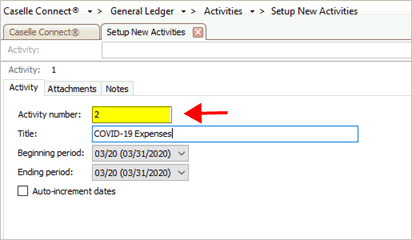
Activity number box
4. Use the Title box to enter COVID-19 Expenses.

Title box
5. Use the Beginning Period box to select 03/20 (02/29/2020).
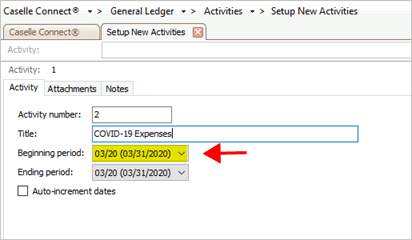
Beginning period box
6. Use the Ending Period box to select 12/20 (12/31/2020).
Why am I using 12/20 (12/31/2020)? Congress will determine the end date. For now, use the last day of the year (12/20 (12/32/2020)).

Ending period boms.
Connect Accounts Payable. Use an activity to enter invoices and requisitions. This help topic shows you how to enter the COVID-19 activity on a requisition, see How do I assign a requisition to a GL activity? (Accounts Payable) It's the same steps to attach the COVID-19 activity to an invoice.
Connect Payroll. Use an activity code to enter payroll checks. To learn how to add the COVID-19 activity to an employee allocation, see How do I link an allocation to a GL activity? (Payroll)
Connect Timekeeping. You can add a default GL activity to certain timekeeping activities. To learn how to add a GL activity code to a timekeeping activity, see Tracking an Activity Code by GL Account.
Related topics
How do I add a GL activity to an existing transaction?
Yes, you can also add a GL activity to an existing transaction, for example, an invoice or payroll expense. Edit the transaction to add the GL activity code for COVID-19 and then save it. You can also add the GL activity code for COVID-19 to any transaction that has posted to Connect General Ledger.
What if I'm having trouble adding the COVID-19 activity to a transaction? Call customer support at (800) 228-9851 for assistance.
How do I view activity for COVID-19 in Activity Inquiry?
To view activity for COVID-19, use Activity Inquiry in Connect General Ledger. An invoice from Accounts Payable will attach the COVID-19 activity to the invoice and the check. The COVID-19 activity code will be included in the AP and CDA journals. Activity Inquiry will show the AP and CDA journals, which would appear to double the COVID-19 activity amount in Activity Inquiry.
You can use Options (F12)  to exclude certain journals from displaying in Activity Inquiry.
We recommend excluding the CDA journals because the AP journal is the
journal that stores the expense posting.
to exclude certain journals from displaying in Activity Inquiry.
We recommend excluding the CDA journals because the AP journal is the
journal that stores the expense posting.
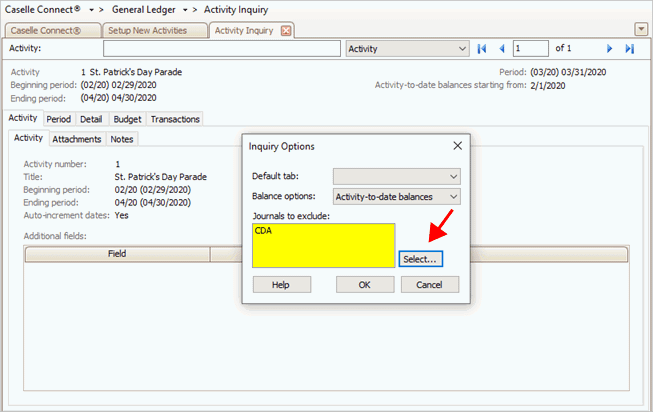
Journals to exclude box in Inquiry Options
2020Mar23
Copyright © 2025 Caselle, Incorporated. All rights reserved.