In this Topic Hide
Years of service refers to the number of years an employee has worked for an employer. When a terminated employee is rehired at a later date, you can use Additional Years of Service to record any additional years worked. The Payroll application will add the Additional Years of Service to the Years of Service and use the total to calculate dates for retirement, 401K, and so on.
An allocation is an amount that has been set apart, or earmarked, to distribute to specific accounts.
GL account
A GL account is an account in the General Ledger that records credits and debits.
GL activity
A GL Activity refers to a user-defined code that is created in Connect General Ledger for reporting resources and transactions. The GL activity code can report on subsystems that are interfaced to the Connect General Ledger. This interface provides an efficient means of tracking and reporting on a GL activity code.
Job number
A job number refers to a user-defined code that is created in Connect Project Accounting for reporting resources and transactions associated with a specific job. You can use a job number to manage transactions created in Connect General Ledger and the Connect Project Accounting Suite, which includes Project Accounting, Materials Management, and Asset Management.
Percent
This is the percent of the employee's pay to allocate to the selected GL account.
Show manual allocations
A manual allocation is an amount that is distributed to an account by hand, while an automatic allocation is an amount that is distributed by a routine. Use Show Manual Allocations to include amounts that have been allocated by hand in the transaction grid.
Workers compensation
A WC class code is a three or four digit code assigned by the Workers Compensation organization. Class codes describe different employee job duties and responsibilities.
The anniversary date occurs on the same day each year to mark one full year of employment.
The annual wage is the amount paid to the employee during a calendar year. These fields work together to calculate the hourly rate and annual wage: Hourly Rate, Annual Wage, Pay Schedule, Pay Grade, and Pay Step.
What do you want to do?
I want to enter the hourly rate. Use the Hourly Rate field to enter the amount the employee will earn per hour.
I want to use the annual wage to calculate the hourly rate. Use the Annual Wage field to enter the amount the employee will earn per year. Then, if you have not already entered the Estimated Annual Hours, fill in the number of hours the employee is expected to work per year. The routine will calculate the hourly rate for you.
What if a wage difference exists?
A wage difference occurs when the pay schedule, pay grade, and pay step show a different total for the annual wage than the annual wage that is displayed in the Annual Wage field. To fix the difference, click the link to Change to ##,####.## to update the amount.
An attachment is a file, document, PDF, or image that you want to save as part of the employee's record in Connect applications.
Enter the date of the employee's birth. Example: MM/DD/YYYY
A contact is a person serving as a go-between or connection, with a special responsibility to serve an account or a customer. Use the options on the Contacts tab to add, edit, or remove a name from the Contacts list.
A department is a section of an organization that handles a particular job or functions in a particular manner.
Is the employee assigned to a department?
Yes, the employee is assigned to a department. Use the Department field to select a department name.
No, the employee is not assigned to a department. Select <blank> as the Department.
How do I add a department?
Use Connect Payroll > Organization > Departments to add, modify, or delete department names from the Department drop-down list.
A direct deposit, also known as an Electronic Funds Transfer, disburses funds from the employer's account to an employee's checking or savings account. Use the options on the Direct Deposit tab to set up the bank routing information for the employee's checking or savings account.
How do I add a disbursement?
On the Direct Deposit tab, click Add a New Disbursement. Next, fill in the options at the bottom of the form.
How do I remove a disbursement?
On the Direct Deposit tab, click to select a disbursement from the Direct Deposit grid. Click Delete the Selected Disbursement.
___
Account number
Use Account Number to enter the account number that belongs to the employee's checking or savings account. The disbursed amount will be deposited in this account.
Amount
If the Type is Amount, then use Amount to enter the disbursement amount.
Bank
This bank is the name of the bank that holds the employee's checking or savings account.
Percent
If the Type is Percent, then use Percent to enter the percentage of the total amount to deposit in the employee's checking or savings account.
Status
The status refers to the direct deposit status. When an employee requests a direct deposit, the employee's request enters a prenotification phase. The prenotification phase verifies the bank information that the employee provided is correct. When the prenotification phase is passed, the direct deposit status changes to active.
When the direct deposit transfer is not needed, or the employee is terminated, you can change the status to inactive to stop the fund transfer.
Transaction type
A transaction type is a group or category that defines the accounting behavior to record an exchange or transfer of goods, services, or funds. In this instance, the transaction type refers to the type of bank account that will receive the disbursed funds.
Type
Use type to define the accounting behavior of the disbursement. Use amount to disburse a set dollar amount. Use percent to disburse a percentage of the total.
A driver license is an official document that states that a person may operate a motorized vehicle. A driver license number is a unique number that is assigned to the driver license.
The employee number is a unique number that is assigned to an employee record.
The contact information is the address, telephone number, and email address.
The marital status refers to an employee's legal standing as married or single. Use S for single, M for married, D for divorced, or W for widowed.
An employee type defines the accounting behavior, including tax status, for the employee. Use 1099 to report distributions from retirement plans, contractors, interest income, dividends, etc. Use 945 to report withheld federal income tax from non-payroll payments.
The annual hours is the number of hours worked during a calendar year. Use Estimated Annual Hours to enter the number of hours that you expect the employee to work during a calendar year. For example, Jane works 40 hours a week. When she fills in this field, she calculates 40 hours per week x 52 weeks and enters 2080 as the estimated annual hours.
How many hours do you expect the employee to work in a calendar year?
Use the Estimated Annual Hours field to enter the number of hours.
The gender refers to the sex of the employee.
The hire date is the day an employee accepts the offer of employment..
The hourly rate is the amount the employee is paid per hour. These fields work together to calculate the hourly rate and annual wage: Hourly Rate, Annual Wage, Pay Schedule, Pay Grade, and Pay Step.
A check number is a unique number that is assigned to each check. Use this option to add the check number for the check that paid the compensation amount to the employee.
Employee amounts includes wage amounts for pay codes that report gross and fringe benefits.
An employer paid amount includes benefit amounts for employer-paid pay codes.
A W-2 Form is the form that an employer sends to the employee and the IRS at the end of the year. The W-2 Form reports the employee's annual wages and taxes withheld from the employee's paycheck. Use Include on W-2 Form to select the checkboxes that will be selected on the employee's W-2 Form. Use the instructions on the W-2 Form at irs.gov to determine how to fill in this section.
A statutory employee is an individual that runs their own business but is treated like a hired employee for tax purposes.
A retirement plan refers to a qualified retirement plan.
Third party sick pay is a disability insurance benefit that provides employees with partial or full wage benefit payments while on long-term medical leave. The payments are not made through the employer, but through an insurance company, union plan, or state temporary disability plan.
A terminated employee is an employee who has a date recorded in the Termination field in the employee's record.
A job position is the title assigned to the employee's job. For example, the job position for the individual that runs the city is the City Manager.
The job class defines and describes the duties and responsibilities of a job position.
The light blue background means the field is a self-validating field, in other words, you can use the items listed in the drop-down list, or you can add a new item.
A woman's maiden name, also known as a birth name, is the family name that she uses before she is married.
A check is a written document that directs a bank to pay money as instructed. Use Mail Check to mail the employee's paycheck.
Do you want to mail the employee's paycheck?
Yes, send the employee's paycheck by mail. Click to select Mail Check.
No, do not send the employee's paycheck by mail. For example, use this option if the employee will pick up a paycheck or use direct deposit. Click to deselect Mail Check.
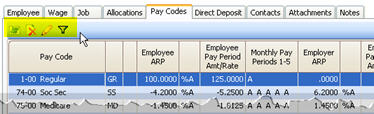
A pay code is an account in payroll that records hours worked for an activity. The Pay Codes tab displays the pay codes that the employee is subject to. Use the options on Pay Codes tab to add, remove, or edit pay codes on the employee level.
When you make changes to the pay code on the employee level, the changes will be saved in the employee's file. None of the changes that are made on the employee level will change the original pay code that is stored in the Pay Code table.
Select pay codes
Use Select Pay Codes to add or remove pay codes from the employee's record.
Delete selected pay code
Click to select a pay code from the grid on the Pay Codes tab. Then, click Delete Selected Pay Code to remove it.
Toggle pay code detail display
You can view the Pay Code grid or click Toggle Pay Code Detail Display to view and edit the pay code detail. Remember, the changes that you make to a pay code in the employee's record will only be saved for the current employee. If you need to make global changes to a pay code use Organization > Pay Codes.

If you need more information to fill in the form, click here to view a list of definitions. The definitions are shown in alphabetical order.
Show only employees with the selected pay codes
Use Show Only Employees with the Selected Pay Codes to filter the list of employees. First, click to select a pay code from the grid on the Pay Codes tab. Then, click Show Only Employees.
The pay grade is part of the pay schedule or pay scale that corresponds to level of responsibility and requirements to fill the job. See Pay Schedule.
A pay period is the interval in which you choose to pay your employees. For example, weekly, semi-monthly, monthly, quarterly, or annually. The pay period frequency is the number of pay periods that occur during a unit of time. For example, once each month, once each quarter, and once a year are examples of commonly used frequencies.
How often will the employee be paid?
Annual - pay once a year.
Biweekly - pay every two weeks.
Daily - pay once each day.
Monthly - pay once a month.
None - pay as needed.
Quadweekly - pay every four weeks.
Quarterly - pay once every three months.
Semi-annual - pay once every six months.
Semi-monthly - pay twice a month.
Weekly - pay once a week.
A pay schedule, also known as a pay scale, is a document that defines how much an employee can earn for a given job. The pay grade corresponds to level of responsibility and requirements to fill the job. While the pay step refers to the monetary incentive to reward the employee for work well done or length of service.
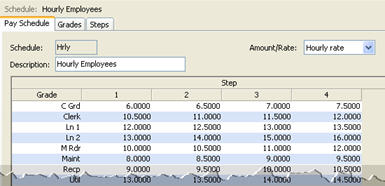
The pay step is part of the pay schedule or pay scale that defines the monetary incentive to reward the employee for work well done or length of service. See Pay Schedule.
The payroll type refers to the method of payment. For example, Hourly or Salary. The light blue background means the field is a self-validating field, in other words, you can use the items listed in the drop-down list, or you can add a new item.
Report Dates is the report date range.
Use the report style to select how much information will print on the report. The detail refers to the small elements, or pieces, that make up a transaction. Use a summary to add up the selected transactions and post the amount as a single line on the report.
See Allocations.
If the Employee Marital Status is married (M), use this section to fill in the spouse's name and birth date.
A Social Security number is a unique number assigned to each individual that can work legally in the United States.
What is the Social Security number?
Use the Social Security Number field to enter a nine-digit number. Do not key dashes. Example: 555555555
The start date is the first day an employee performs services for pay, in other words, the first day of work. The employer uses the start date as the first day to begin withholding income tax.
The status refers to the condition of employment in time worked. For example, an employee that works 40 hours a week is a full-time employee. An employee that works 20 hours a week is a part-time employee. While an individual that only works when needed is a contract or temporary employee.
The light blue background means the field is a self-validating field, in other words, you can use the items listed in the drop-down list, or you can add a new item.
When an employee earns wages, he must pay taxes on the earned wages, in other words, the employee is subject to tax. The Subject To grid displays a list of pay codes that deduct amounts from the employee's paycheck.
SUTA, State Unemployment Tax Authority, is an unemployment tax an employer pays into the unemployment fund that an employee can draw from when he or she is unemployed. The SUTA Type refers to the employee's status as exempt, regular, or seasonal.
When an employee is terminated, you enter the termination date in the employee's file. The termination date prevents users from using the terminated employee record to create transactions, for example, to calculate paychecks, benefits, leave time, and so on.
A WC class code is a three or four digit code assigned by the Workers Compensation organization. Class codes describe different employee job duties and responsibilities. The WC Class Code drop-down list includes the class codes for the selected work state.
The work state is the name of the state where the employee is employed. The work site is the name of the location where the employee is employed.