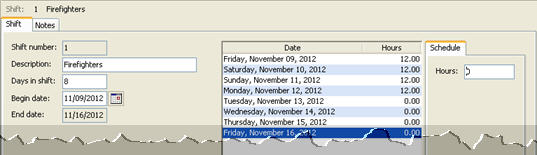
A shift refers to hours worked by an employee during a period of time when the job requires 24-hour coverage seven days a week. For example, firefighters may work four 12-hour days, followed by four off days. In this example, the shift length is eight days.
In this Topic Hide
Each employee can only be tied to one shift.
Beginning and ending dates must be manually updated.
Regular hours calculate using the pay period dates. When the shift ending date occurs during a pay period, the system will total the hours worked for the days in the shift.
Hours in excess of the Hours Worked for Overtime Test will be treated as overtime hours for that pay period.
Add a shift. Use Connect Timekeeping > Organization > Shifts to define the properties for a shift schedule.
Update the shift employee records. Use Connect Payroll > Employees > Modify Existing Employees to look up the employees that are assigned to the shift. Use the options in Modify Existing Employees to associate the employee with the shift schedule.
Calculate paycheck and benefits for shift employees. Follow the Payroll Steps Checklist to calculate paycheck and benefits for shift employees.
Finally, update the shift begin date. At the end of the shift, use Connect Timekeeping > Organization > Shifts to update the shift Begin Date.