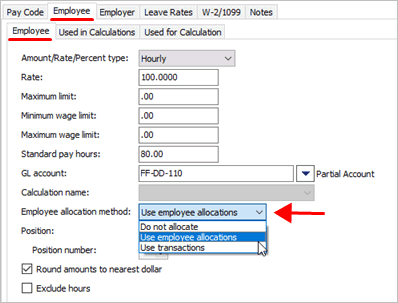
Payroll can distribute a pay code amount using the allocations that are saved for an employee.
To allocate based on an employee's allocations, set up the allocations on the employee's record. See the help topic titled How do I set up employee allocations?
1. Open Connect Payroll > Organization > Pay Codes.
2. Use the field titled Pay Code to enter a pay code and sub code.
3. Click to select the Employee tab.
4. Click to select the Employee subtab.
5. Use the Employee Allocation Method to select Use Employee Allocations.
Employee Allocation Method
The pay code will use the employee's allocations to allocate the employee's portion of the pay code.
2019.02, 2018Dec17