Payroll Year-end Checklist
The IRS requires organizations to report specific information in Boxes 10, 11, 12, and 14. If you're not sure what to enter in each box, contact your accountant, auditor, or the IRS to determine if you are reporting the amounts that should be reported in each box.
Reminder... If you have any questions about the information required on your W-2 forms, consult your accountant, auditor, or the IRS for the specific information required for your site.
Note: Caselle Service staff are not payroll tax experts. We can help you put your payroll tax information into the appropriate boxes, but we CANNOT help you determine what amounts need to be reported in each box.
For amounts that need to be reported in Boxes 10, 11, 12, or 14, you will need to verify the special pay code flags and check the appropriate boxes in Organization > Pay Codes to place the information for each pay code into the correct box on the W-2.
Important! Your accountant or auditor should advise you on the appropriate code to select for each pay code as well as any other information that may be required for each pay code.
The IRS requires organizations to report specific information in Box 12. Contact your accountant, auditor, or the IRS to determine if you have amounts that should be report in Box 12.
Example: 401k reports “D” in Box 12, Health Insurance reports “DD” in Box 12.
What about Box 12 codes for health insurance pay codes? Make sure you assign DD to Box 12 on every health insurance pay code.
Do this...
1. Open Connect Payroll > Organization > Pay Codes.
2. Look up the pay code to report in Box 12.
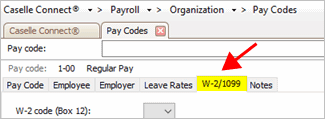
3. Click to select the W-2/1099 tab.
W-2/1099 tab
4. Select the appropriate code that describes the pay code amount from the W-2 Code (Box 12) list.
To view the Box 12 Codes list and descriptions, click here.
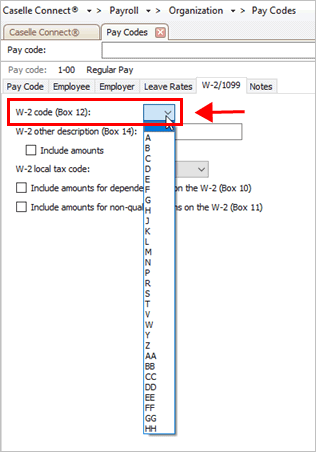
W-2 code (Box 12) list
5. Repeat step 4 for each pay code in use at your site with Box 12 requirements.
What do the Box 12 codes mean? Each of these codes and their descriptions, as shown here, can be found by clicking the What’s This? Help button (CTRL+W) and then moving the mouse over the W-2 Code (Box 12) field. You can also use the Box 12 Codes List or visit the irs.gov website for more information.
The W-2 Box 12 code is saved on the selected pay code.
202011, 2020Oct08
Other tax information is reported in Box 14. Box 14 descriptions may include the following items: Contributions to Employee Pension Plans, Union Dues, Life or Health Insurance Premium Payroll deductions, Moving Expenses, etc.
What if I don't know what to enter in Box 14? If you have any questions about the information required on your W-2 Forms, consult your accountant or auditor for the specific information required for your site.
Does your site require a description for Box 14?
Yes, my site requires a description for Box 14. Enter it in the W-2 Other Description (Box 14) field. If you need to include the Box 14 amount, select the Include Amounts checkbox.
No, my site does not require a description for Box 14. Continue to the next question.
Is the pay code for dependent care? (For example, such as a cafeteria plan payroll deduction.)
Yes, the pay code is for dependent care. Select the Include Amounts for Dependent Care (Box 10) checkbox.
No, the pay code is not for dependent care. Continue to the next question.
Are you required to print the total amount of distributions to an employee for a non-qualified deferred compensation plan?
Yes, I need to print this information. Select the Include Amounts for Non-Qualified Plan on W-2 (Box 11) checkbox.
No, I do not need this information. Continue to the next step.
202011, 2020Oct08